Connect your data, maps and applications.
RestFrontage is Immersive’s service layer. Its OData and Web API interfaces connect the platform to your information system, within the permissions granted to each application.
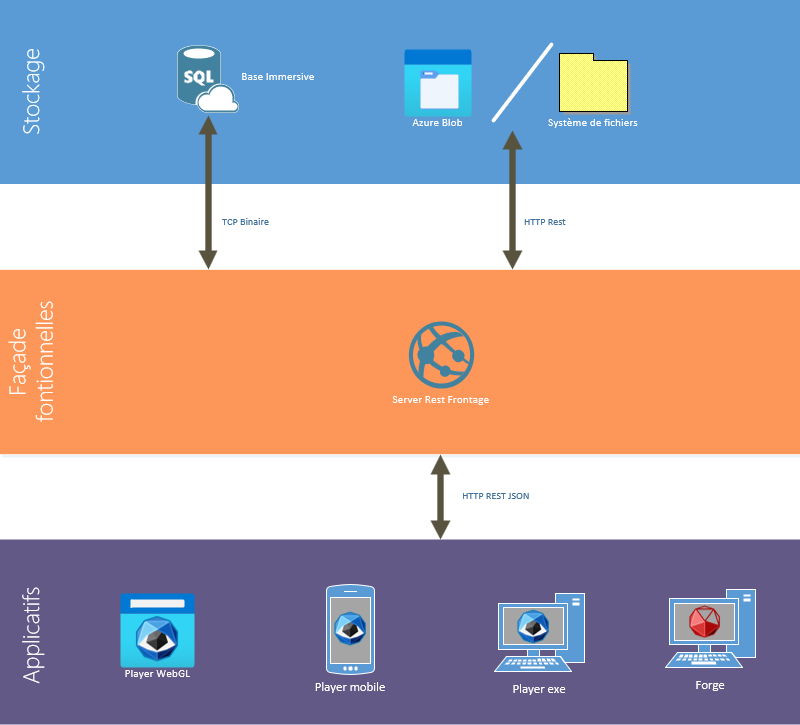
A shared server for your data exchanges.
RestFrontage connects client applications to Immersive resources. It exposes data and operations for working with maps, feeding the platform and building business applications.
Hosting that fits your infrastructure
Built on Microsoft technologies, the server can run on a physical server, a virtual machine or a Web App, depending on your chosen architecture.
Structured data
The architecture shown uses data hosted in SQL Server. Applications access resources through the services exposed by RestFrontage.
Authorised exchanges
Requests use an identity and its associated permissions. Integrations respect the scope of the data and actions that identity can access.
Three entry points to suit your needs.
Access resources through OData, call business operations with the Web API or embed maps in your interface with the JavaScript SDK.
OData: access the data you need.
The OData interface exposes Immersive resources in a structured form. It lets you build queries suited to the information your application needs.
Available operations let you feed your data into Immersive or use its resources in your information system, according to the instance’s contracts and permissions.

Web API: call business functions.
The Web API exposes higher-level operations for interacting with Immersive features from your tools and business processes.
Each call follows a contract: required parameters, expected results and access conditions. These interfaces provide an entry point for applications that need to act on the platform.
JavaScript SDK: the map in your application.
The JavaScript SDK complements access to the services, letting you embed Immersive maps in web interfaces and interact with their data and features.
Build an experience focused on your users while relying on the same mapping system and platform services.
Understand API calls with Swagger.
The server’s Swagger description presents operations and their request contracts. It helps identify parameters and responses before developing an integration.
Use the description for the instance you are working with. The Developer Network supports your first steps; our team can help prepare a demonstration environment suited to your project.
Prepare your integration.
Successful data exchange starts with identified data, understood calls and clear responsibilities. Agree on these points with your teams.
Define the need
Identify source data, relevant Immersive objects and the direction of data exchanges.
Choose the interface
Select OData, Web API or the SDK based on the required operations and user experience.
Define access
Define the identity used and the permissions needed for the project’s data and actions.
Validate operation
Check responses, errors and expected volumes, then define who will monitor the integration.
Your next project starts here.
Move from discovery to hands-on learning with the Developer Network. Find technical articles, tutorials and resources to create maps, connect equipment and customise Immersive.