Less noise. Clear priorities.
On a site with many assets and events, displaying everything is not enough. Beholder filters narrow the map and lists to an area, a role or a situation, helping you identify what needs action.
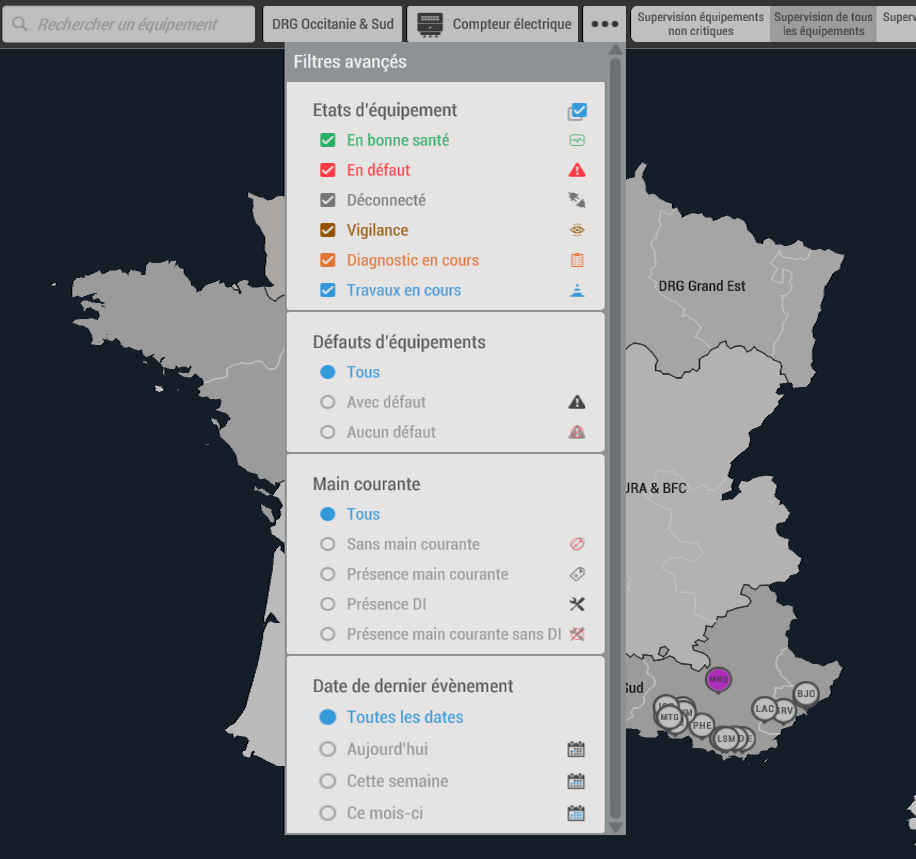
Combine criteria, refine the results.
Criteria work together. As you refine a search, the displayed equipment and status information adapt to your selection. These demonstrations show five complementary ways to explore the same site.
Combine
Combine a location, an equipment family and a status to answer a specific question.
Prioritize
Highlight critical conditions or situations that have not yet been addressed.
Keep your scope
Search applies to the information the signed-in profile is allowed to view.
A building, an area, a location.
The location filter limits the display to one or more places. Focus on a building, a floor or an area according to the structure defined for your site.
The level of detail follows the customer’s organization. Access rights still apply: selecting an area does not expose objects outside your authorized scope.
Focus on an equipment family.
Display only lifts, goods lifts, temperature sensors or another category in your asset data. The view focuses on objects relevant to the task.
Alarms and status information follow the selected filter. Combined with location, this lets you examine a terminal’s lifts without reviewing every asset.
Identify what needs intervention.
Combine equipment status with intervention information to highlight situations that need attention. The aim is to connect problem detection with preparation for action.
The example finds equipment that failed today and has no intervention request yet. Available criteria depend on the data and maintenance workflow configured.
Criteria tailored to your work.
Custom filters can reflect your operating rules: criticality, temperature thresholds, consumption or other information available in your system.
You can focus on critical assets or readings exceeding a defined threshold. Units, values and conditions must match the data actually collected.
Find equipment through its description.
Search for a name, type or equipment metadata. Text filtering provides direct access when you already know an identifier or part of a label.
Combine this with other filters to refine the selection, then open the result to view its information and available actions.
Filters and permissions work together.
A filter selects useful information from what you are allowed to view. Permissions define that scope first; data cards and reports then help you use the results.
Start with the questions your teams ask.
Identify the criteria that will help your teams spot important situations and prepare their actions.