Scripting: Query
- Tutorial
Tutorial
This chapter presents the Query system, which allows you to precisely target related objects to equipment to manipulate and customize their display in the 3D digital twin.
The Query system allows you to retrieve some of the objects associated with a piece of equipment in a targeted manner to then call methods to manipulate and customize their display in the 3D digital twin.
General principle
Equipment can be composed of several objects.
For example, a Portal may consist of Two doors : a left door and a right door.
Thanks to Query's system, it is possible to recover only the left door or the right door, even if both are associated with the same portal equipment.
The result of a Query is a JavaScript object on which different methods can be called.
These methods automatically adapt to the result returned by the Query. For a complete list of possible methods, refer to the chapter "3D customization".
Retrieve items by type
It is possible to filter objects according to their type, for example 3D models.
To do this, you need to specify the . followed by the type to be filtered.
The list of possible types is as follows:
model: Any 3D modelicon: Icons (equipment markers)zone: a zone (soils)structure: a structure (wall)polyline: one line
JS script:
// Query des objets de type Modèle 3D
equipment.Query(".model");
Result:
This Query returns all 3D Model objects associated with the equipment.
Retrieve items by name
It is also possible to retrieve items from their names.
To do this, you need to specify the # followed by the name of the object you are looking for.
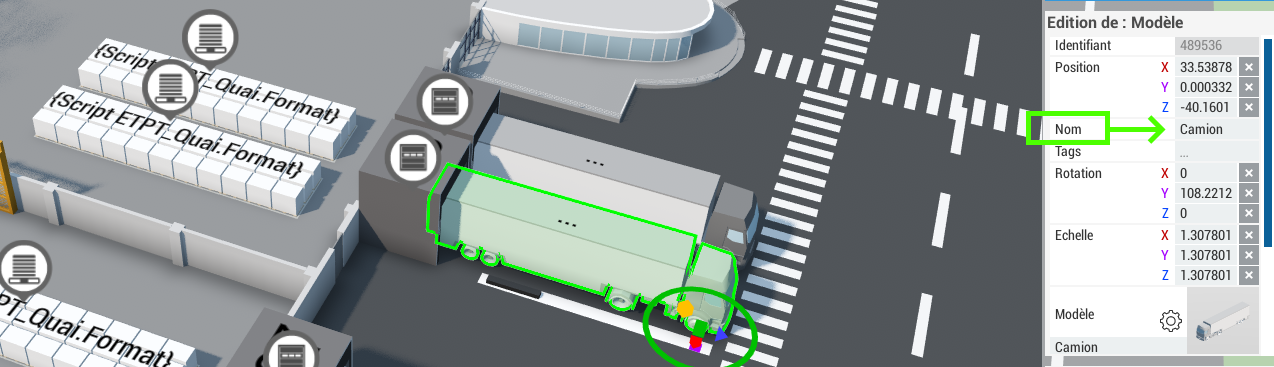
The configuration of an item's name is done directly from Forge.
When you select an object, you can associate it with the name you want.
Here Camion.
JS script:
// Query des objets portant l’ID "Camion"
equipment.Query("#Camion");
Result:
This Query returns all objects with the name Left.
Combine multiple rules in a Query
The Query system allows you to combine several criteria in order to refine the selection of objects.
AND Operator (ET)
To create a Query that must meet all parameters, you need to separate the criteria with a space.
JS script:
// Query des objets de type Modèle 3D et portant l’ID "Gauche"
equipment.Query(".model #Gauche");
Result:
This Query returns the 3D model with the name Left.
OR Operator (OR)
To create a Query that must meet at least one of the parameters, you need to separate the criteria with a comma.
JS script:
// Query des objets portant l’ID "Gauche" ou l’ID "Droite"
equipment.Query("#Gauche, #Droite");
Result:
This Query returns objects with the name Left or the name Right.