View and understand user logs.
- Undefined type
The page User logs Immersive RestFrontage centralizes authentication-related events: login attempts, successful authentications, failures, and some token renewal denials. It helps to understand why a user is unable to log in and to find the events preceding an incident.
Access user logs
- Log in to RestFrontage with the account Cerebrate.
- Open the page Security, available at
/Security. - In the Block User logs, click View user logs.
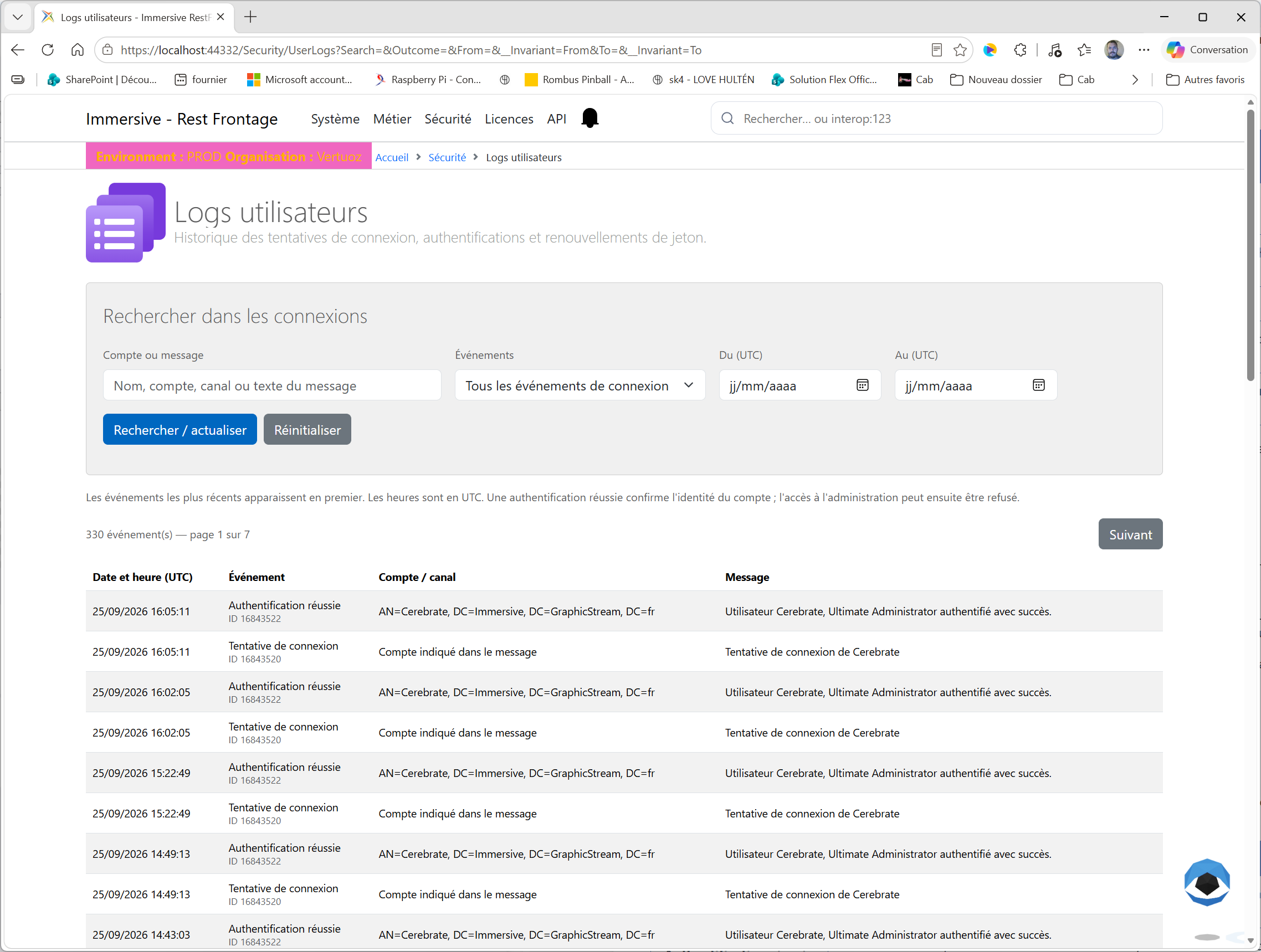
The page opens at /Security/UserLogs. It presents a search form, the number of events corresponding to the criteria and a table of results.
This page is reserved for Cerebrate. Domain administrator status or group membership EnhancedAccess does not provide access to this global journal on its own.
This view gathers login events from multiple accounts, including attempts for which no user could be identified. It complements the logs tab in a user's record.
Read the history
The most recent events appear first. Each row corresponds to an event recorded by the system.
| Column | Contents |
|---|---|
| Date and Time (UTC) | The time of the event, displayed in day/month/year format and hours:minutes:seconds. |
| Event | Label describing the situation: attempt, success, incorrect password, locked account, etc. The numeric identifier for the event type appears below the label. |
| Account / channel | The identifier of the account associated with the journal, usually its distinguished name in the directory, called a DN. If there is no user channel associated with it, the Account indicated in the message invites you to read the details. |
| Message | Text recorded during the event. It provides the available context, such as the account presented, the number of consecutive failures, or the end date of a lock. |
Search times and dates are expressed in UTC, without converting to the browser's local time. To find an incident reported in local time, convert the date and time to UTC, taking into account any change in the day.
The counter shows all the results corresponding to the filters. The table displays 50 events per page. Use Previous and Next to browse the results; the search criteria are preserved.
A single connection can produce multiple rows, such as an attempt and then its result. Therefore, the number of events does not represent a number of connections or a number of separate users.
Search for events
The criteria of the form Search Connections combine: An event must satisfy all the filters filled in to appear.
Search for an account or message
In Account or message, enter part of the account, its DN, or the text you are looking for. The search is for the channel and the recorded message, not for a selection of users in the directory.
A display name can therefore be found when it appears in the message. On the other hand, a label of the column Event is not necessarily present in the recorded text: use the Events to select a result family.
Choose an event family
| Filter Value Events | Results displayed |
|---|---|
| All login events | The set of connection events recognized by this page. |
| Attempts | Logged sign-in requests, including single sign-on, or SSO, attempts. |
| Successful authentications | Events confirming successful authentication. |
| Failures and rejections | Incorrect passwords, accounts not found, disabled, expired or locked, SSO failures and renewal denials listed. |
| Token renewals | Renewal denials identified in logs, such as when a token cannot be decrypted or the identity provided is inconsistent. |
A token allows an application to present the identity of a user who is already authenticated. A renewal denial can therefore affect an existing session, but it does not correspond to a new password entry.
Set a time period and start the search
Inquire From (UTC) and To (UTC) to limit the time period. Both dates are included: the end date covers the entire day chosen in UTC. You can enter only one terminal. Without a date, the search is for all available history.
Click Search / Refresh button to apply the criteria and return to the first page of results. This button also allows you to search for newly registered events: the list does not update automatically.
The Reset clears the filters and returns to the first page. If the start date exceeds the end date, correct the time period indicated on the form.
Understanding the results
The label gives an initial indication. The associated message allows you to specify the cause and decide which check to do.
| Event | Interpretation |
|---|---|
| Attempting to connect | A connection request has been received. This line alone does not allow a conclusion to be made or failed. |
| Authentication Successful | The identity of the account has been validated. It remains to distinguish this validation from the access rights to the administration. |
| Incorrect password | The password presented was denied. The message may indicate the number of consecutive failures. |
| Account Not Found | The account presented could not be found. Check the username used and the information in the message. |
| Deactivated or expired account | Authentication was denied due to account status. Check their card to distinguish between a deactivation and an expiration. |
| Locked Account | An attempt was denied during a temporary lockout. The message shows the date and time when the lock ended. |
| SSO Attempt/SSO Failure | Single sign-on event. The message specifies the step or difficulty encountered. |
| Renewal refused | An operation related to the renewal of the token was declined. Read the message to identify the reason saved. |
A Authentication Successful does not mean that the user is authorized to administer RestFrontage. The verification of administrative access rights then occurs and can still refuse entry. A message such as "This user is not authorized to administer..." can therefore appear despite successful authentication in the logs.
Diagnosing a connection problem
Find a user's failures
- Ask for the ID used and the approximate time of the incident.
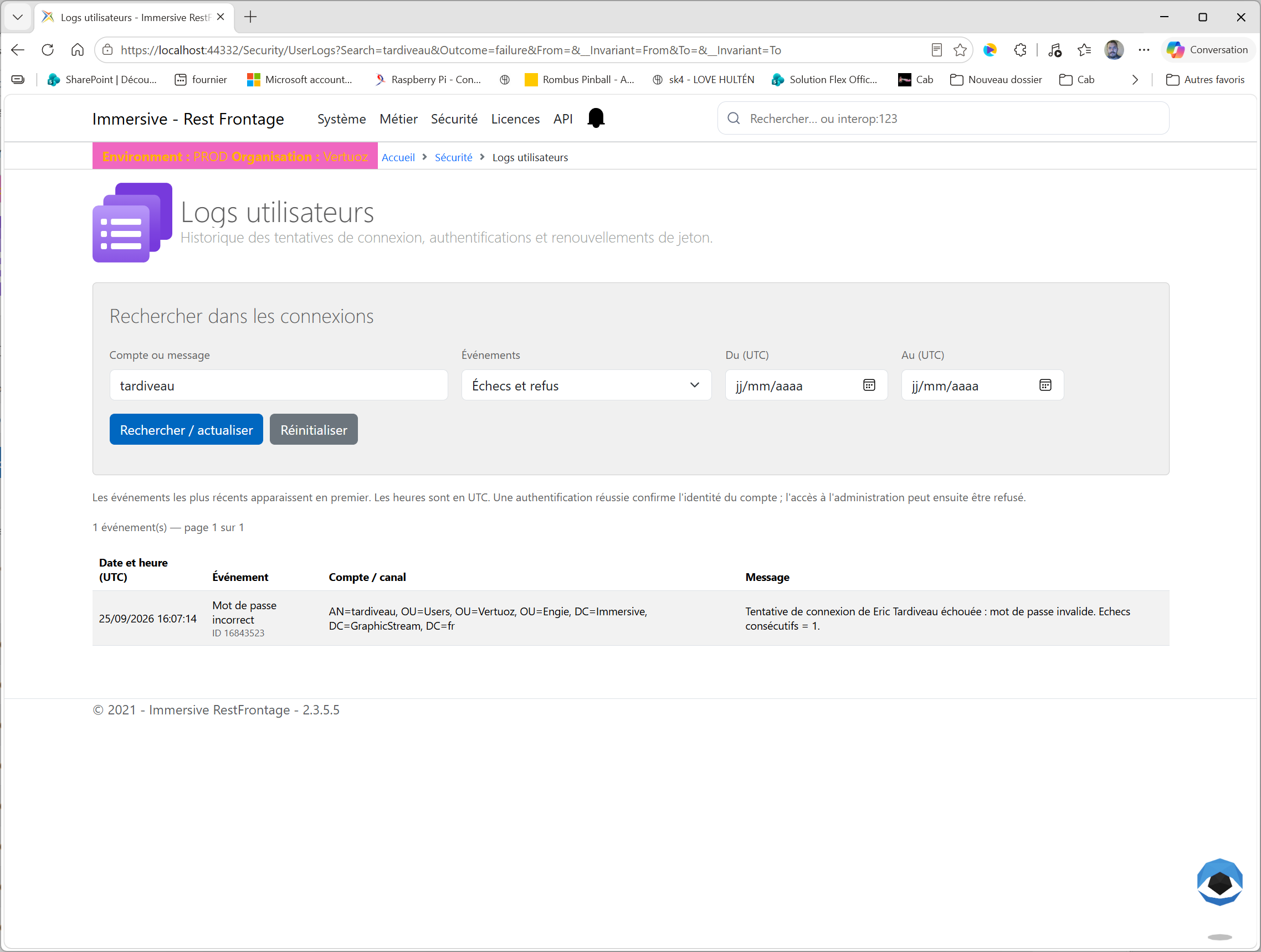
- In Account or message, enter a sufficiently precise part of this identifier or its DN.
- Choose Failures and rejections in Events.
- Set the search period to UTC, and then click Search / Refresh.
- Read the message of each relevant result to identify the reason for the rejection.
- Iron on All login events and restart the search to place the failure among the attempts and any neighboring successes.
For example, multiple events Incorrect password, followed by an event Locked Account, can be used to trace a series of failures and then a rejection during the lockout. Then check the user's record to check their current status.
Verify authentication after correction
After the user tries again, keep the account criteria, select Successful authentications, then click Search / Refresh. Verify that the date and time of the result match the retry.
This verification confirms the registered authentication. If the administration remains unreachable, continue the diagnosis on the account authorizations.
Understanding a search without results
If the table shows There are no connection events that match these criteria, expand the period, check its conversion to UTC and select All login events. Then remove the search text if necessary.
An attempt on an account that cannot be found can be recorded without a user channel and can only be identified by its message. The absence of a result is not enough to prove that there was no attempt: only events that are recorded and still stored can be viewed.
What this page allows
The page provides a read-only history. It does not modify accounts and does not offer unlocking; operations on a user are carried out from their file, with the necessary rights.
It shows authentication events that are recognized in the logs, including those from password logins and SSO journeys. It is not a list of active sessions or users who are currently logged in.
Not all successful token renewals and denials of access to the administration have a dedicated event in this history. For reliable diagnosis, reconcile the logs with the message the user saw and the current status of their account.