Hub: Overview
- Getting started
Training
The Hub Immersive represents the software layer that interfaces between the data exposure and its consumption by the Beholder.
It represents a universal layer of indirection between a consumer (an Immersive Beholder player for example) and data, regardless of the protocols used to access it.
General presentation
The Hub's role is to receive requests from consumers of IOT data intended for supervision or maintenance and to provide information adapted to the needs of its consumers in response.
The Hub exposes two connection fronts, the first, dedicated to customers/applications consuming IOT data, allows you to contact the Hub and send it requests through a REST front. The second, technical façade allows the Hub to retrieve data through a dedicated protocol.
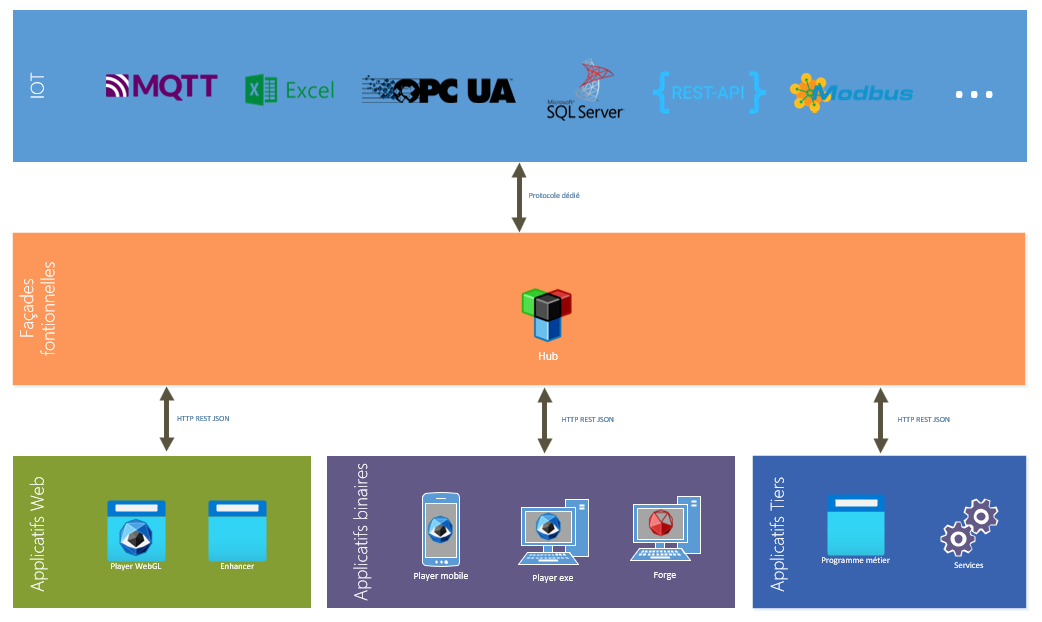
Internally, the Hub is based on three concepts:
- The handle
- The session
- The connector
Handles
Handles represent a route to a piece of data. It consists of:
- A unique identifier for the requester associated with this data
- A path, representing the "connection string" to the data
The path must allow the Hub to determine the protocol and the means to access the data. It is similar to a connection chain that allows the Hub to launch the right technology/connection protocol and to know how to "join" the data to retrieve it.
Let's take the example of a " Temperature sensor ». This could be associated with three properties:
- The current value of the temperature.
- The maximum temperature tolerated.
- The temperature is tolerated.
These three properties could be stored and retrieved via two different protocols/technologies:
- UCI UA —for the current value.
- Excel : For the maximum and minimum tolerated thresholds.
The three paths thus necessary to have the data of this temperature sensor would be respectively:
•	ns=3;s=BAT6062.ETAG2.TEMP.T652145
•	XLSX://SITE/GESTBAT/QUALITVIE.xslx?Sheet=Temps&col=C&cell=22
•	XLSX://SITE/GESTBAT/QUALITVIE.xslx?Sheet=Temps&col=D&cell=22
The first path is a classic OPC-UA path: ns=3;s=BAT6062.ETAG2.TEMP.T652145, the following two have been formatted to be understood by the Hub's Excel Connector: They indicate to open the excel file located in the relative path SITE/GESTBAT/QUALITVIE.xslx and read the columns C and D of the line 22.
It is up to the Hub to interpret these paths, access this data and always send back to the interested software players an up-to-date value of this data.
If the temperature changes, the Hub will rely on the OPC UA protocol to retrieve the current value, if the maximum and minimum acceptable temperature thresholds change, the Hub must make sure that it can read the cell of the relevant excel file(s) to retrieve the value.
Path formatting allows the Hub to determine which protocol to use to join the data.
The Hub has no idea what the business role of a piece of data is: it is not its role.
Sessions
A session represents an access made by a consumer (supervision software, synoptic, or process) wishing both to access data but also to be kept informed of the evolution of this data over time.
When a building is supervised, it exposes a set number of pieces of equipment that are themselves associated with data (targeted by the Handles). See the example of a temperature sensor in the previous point.
The session can be thought of as a list of handles.
The Hub receives this list of Handles. It will ask the Hub to retrieve the linked values and to be kept up to date with their future evolution.
Thus, when the Hub detects the evolution of the value targeted by a handle, it ensures that the session or sessions that requested to process the data receive it when they make an update request.
Connector
A connector represents a channel for accessing data through a particular protocol (OPC UA, Excel, REST, SQL, Modbus, etc.).
A connector can be seen as a plug-in that will be added to the Hub to extend possibilities. The Hub has connectors for a large number of known protocols or technologies (OPC UA, Excel, MQTT, ...).
GraphicStream has developed an API programming interface in .Net that allows you to create a connector dedicated to your needs for a particular protocol that allows a session to issue Handles monitoring requests targeting data accessible in that protocol.
The connector has two roles within the Hub:
- Access to the data
- Make sure to keep the Hub informed of changes in this data over time
So when a session issues a request for handles. The Hub will, for both of them, make a request for support to all the connectors. If a connector manages the protocol exposed by the path of a handle, it will respond favorably to the Hub's request and will be responsible for trying to retrieve the data and ensure that it keeps up to date with the evolution of this data.
Operation
The Hub is therefore the main software, the conductor managing the processing of handles, sessions and connectors.
It can be compared to an event database that; for each data processed; knows how to warn the actors who have shown interest in this data of a development.
Connecting a session
The diagram at the end of this point shows the connection of a session to the Hub and the implementation of an internal process to support the handles that will be emitted by the session.
The first step in any access to the Hub is to create a session. The client will therefore issue a logon request to the Hub.
If this request is accepted, the Hub returns a session identifier (a GUID) that will be used by the client to identify itself in future exchanges.
The second step will consist of creating a list of Handles to send to the Hub. This list is an association between a handle and its path associated with an integer identifier. This identifier will be used by the Hub when it returns a data update. For each value targeted by a Handle, it will indicate the session ID for that handle, its value, a state, and a timestamp
To summarize, the client sends the following data to the Hub in a step called "registration" of handles:
•	son identifiant de session<
•	une liste de [{id :int, handle}]
When one or more values are detected as changed, the Hub returns the following data to the session(s) interested in those values:
• une liste de [{id :int, valeur, date, status}]
The same session must not issue the same identifier for two handles with a different path.
The identifier of a handle is contextual to the session. For the same path, two different sessions can indicate a different ID.
When the Hub receives a list of handles to process, it will determine for each of them if the indicated path is already known.
If it does, it associates the handle with the identifier specified by the session and places the known current value in the list of values to return to that session. The processing for this handle stops there.
If the handle is not known, on the contrary, it will "canvass" all the connectors. The Hub then places the handles to be connected in a special list that will be unstacked gradually. Each handle thus unstacked will be subjected to the different connectors. Connectors that can support the value will manifest and the Hub will ask them to handle this handle.
A connector that supports a handle will first attempt to retrieve the value of the handle. To do this, it opens a connection in the targeted protocol (if it has not already done so) and then tries to join the handle. He thus builds an association path, value, state and timestamp. The statement makes it possible to specify the viability of the value recovery process.
The connector returns this team to the Hub. The Hub stores it internally and notifies the session(s) interested in this path.
The process of sending new handles to the Hub by a session can be repeated as many times as necessary. In environments with limited network, it is advisable to increase the number of calls to reduce the size of the calls.
If a Handle can't be supported by a connector, it remains in the Handle pool to be supported until a connector agrees to process it or a new compatible connector is added to the hub.
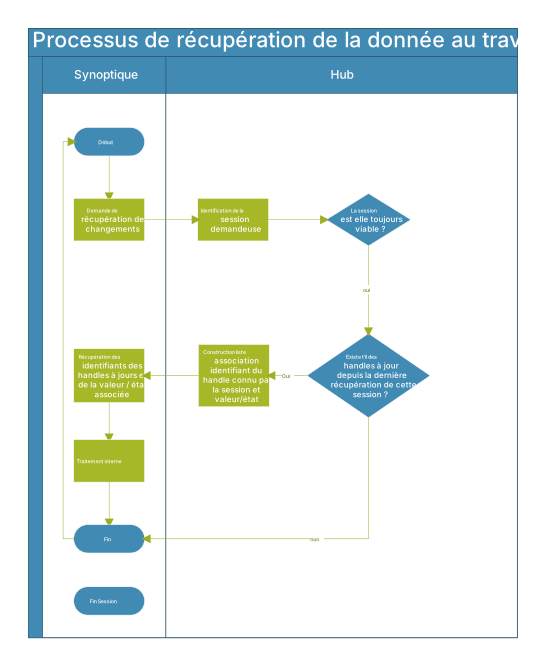
Internal update of data
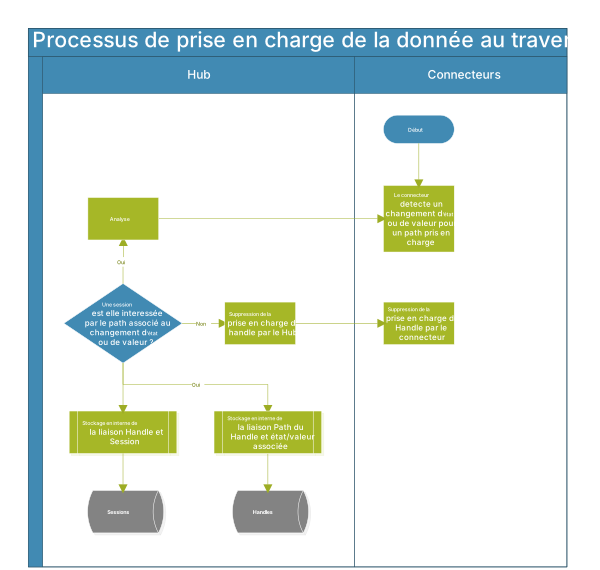
The following schema explains internally, the updating of a data targeted by a supported handle. We saw in the previous point that if a piece of data is of interest to a session, a list of associated identifier associations and handles is prepared while waiting for the session to issue a request to retrieve updates.
The detection of a value update is the responsibility of the connector. If the connector is based on a so-called 'event-based' protocol, it will wait for an event indicating the change in value. If the connector is based on an active gait, it will periodically query the data source for any changes to the values it has been asked to support.
If a change is detected, the connector notifies the Hub of the affected path, any new value, a date of change to that value, or the status and status.
The Hub will analyze this information and determine which, or sessions, are interested in this path. If no active session is interested, it asks the connectors to no longer support this path and unload it.
It prepares a new package for each session that combines the session ID for that path, the value, the state, and a timestamp that will be returned to the next update retrieval request issued by the session. It stores value in parallel by associating it with the path internally. The package containing the changes for a session is flushed when the session retrieves it.
Status of a handle
In some cases, access to handle via a connector is not possible (configuration problems, faulty sensor, hs infrastructure...). When the hub communicates the value of a handle to a session, it must specify its status.
Here are the different possible statuses:
- Unhandled: The handle cannot be managed by the system.
- UnpluggedConnector: The connector associated with the handle is not accessible.
- NoConnectorFound: The protocol specified by the handle does not match any connectors.
- Unreachable: The connector is unable to retrieve the value of the handle.
- ConnectorError: The connector is in error.
- Good: The connector retrieved the value correctly.
- NeverUpdated: The handle is configured correctly but no value is reported by the system.
- TimedOut: The last value is too old, it's time out.
When a status other than "Good" is reported for a given handle, it will appear as disconnected in the system. The user will be able to hover over his associated variable to have the details of the error.
If a client has registered for a handle, the hub has the obligation to return at least 1 piece of information for it, even if the hub doesn't know how to handle it or has a problem retrieving its value. To do this, he combines one of the previous statuses.
Calculation engine: handling failures
The hub may require the implementation of a compute engine that will be set up to meet specific business needs. Some data from the sensors requires processing before being exposed to the sessions, particularly for the reporting of faults.
For a temperature sensor, the hub can, for example, associate a list of faults related to exceeding thresholds to warn the customer of a fault: Temperature too high.
When changing the value of a handle, if the computation engine has identified a defect, it provides in addition to the value of the handle a list of associated failures that will be processed by the player to display the associated variable as a default in the interface.
When a variable changes over time, such as a temperature, an associated failure can remain active on several updates of its value if its calculation rule still remains valid. The failure keeps the information of the date of the arrival of the fault, so if a temperature was updated 10 mins ago, but it exceeds a threshold for 2 hours, the 2 information is correctly presented in the client applications.
The information inherent in a Failure is as follows:
- The name
- The date of the defect
- A list of metadata associated with the calculation (the threshold in the example case of temperature).
- A type of defect. These types depend on the business, so they must be synchronized between the client application and the hub managers.
Handling failures is not mandatory for all handles, only when a specific business rule is needed.
If a fault sensor reports a boolean value with "true" as the active fault, this handle can be directly treated as a fault in the beholder application without having to generate a failure on the Hub side.
Connector Status
In addition to updates to handle values, the hub has the ability to report back to its sessions the internal state of its connectors and the health of the system as a whole.
So if one of its data sources is temporarily unavailable, users connected to a hub are notified that there's a problem with one or more of the system's sub-elements.
The status of connectors is presented in a Beholder player as follows.
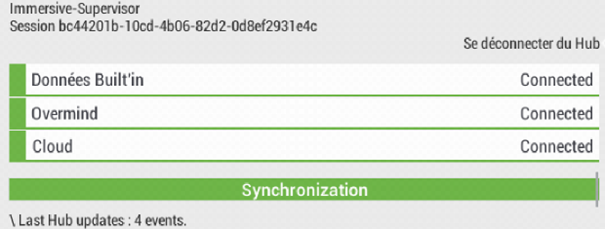
The status of the connectors is for informational purposes only and is not required for the operation of the system.